# django.db.migrations.exceptions.InconsistenMigrationHistory
**URL:** https://forum.djangoproject.com/t/django-db-migrations-exceptions-inconsistenmigrationhistory/14129
**Category:** Deployment
**Created:** [June 5, 2022, 4:06am UTC](https://forum.djangoproject.com/t/django-db-migrations-exceptions-inconsistenmigrationhistory/14129 "2022-06-05T04:06:46Z")
**Posts on this page:** 13
**Page:** 1
### Author:  [@gurbanoglu](https://forum.djangoproject.com/u/gurbanoglu)
#### Post date: [June 5, 2022, 4:06am UTC](https://forum.djangoproject.com/t/django-db-migrations-exceptions-inconsistenmigrationhistory/14129/1 "2022-06-05T04:06:46Z")
Hi, I have recently deleted the directory for an application that I created in Django.
I created the application within an exisitng Django project folder using the following command: python manage.py startapp app\_name
I then deleted the name of the directory for app\_name.
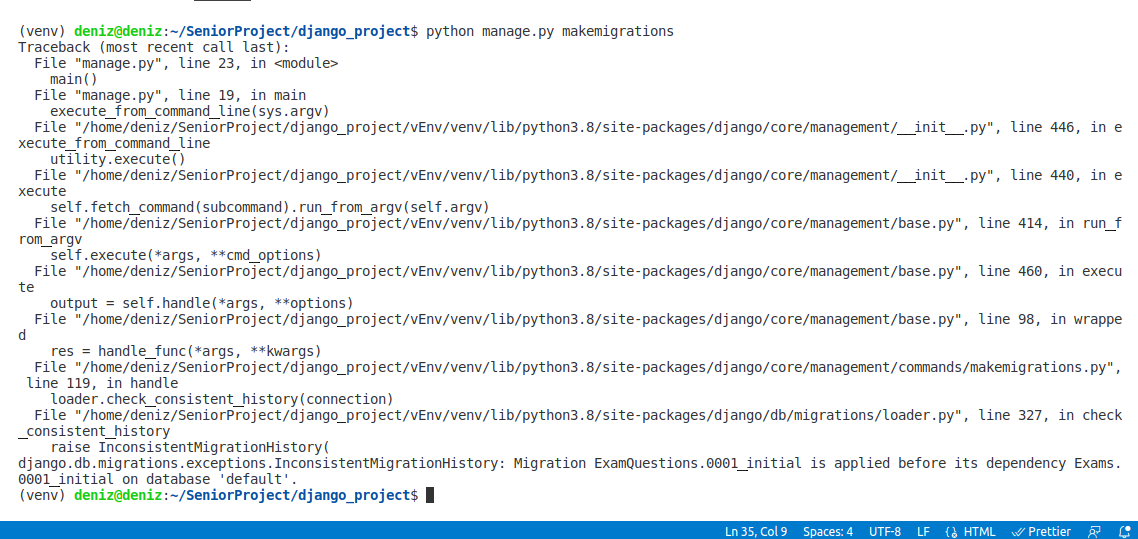
After creating a new application using python manage.py runserver startapp new\_app, I attempted to make migrations with either **python manage.py makemigrations** or **python manage.py migrate** , I receive the following error message in the terminal:
raise InconsistentMigrationHistory(
django.db.migrations.exceptions.InconsistentMigrationHistory: Migration ExamQuestions.0001\_initial is applied before its dependency Exams.0001\_initial on database ‘default’.
I am attaching an image of the error message and will appreciate any advice regarding this. Thank you.
---
### Author:  [@KenWhitesell](https://forum.djangoproject.com/u/KenWhitesell)
#### Post date: [June 5, 2022, 10:58am UTC](https://forum.djangoproject.com/t/django-db-migrations-exceptions-inconsistenmigrationhistory/14129/2 "2022-06-05T10:58:33Z")
> [@gurbanoglu](#):
>
> I then deleted the name of the directory for app\_name.
If you deleted that directory and everything under it (including the migrations directory), your best bet is to drop the database, delete all migrations from your apps and rebuild the database from scratch.
Suggestion for the future - don’t delete files (or directories) without understanding how that’s going to affect the rest of your project.
Yes, it’s possible to delete Django apps, but it takes more than just deleting a directory to do it cleanly. You should also be aware of how doing something like that might affect an existing installation and your options for upgrading a running system.
---
### Author:  [@gurbanoglu](https://forum.djangoproject.com/u/gurbanoglu)
#### Post date: [June 5, 2022, 7:59pm UTC](https://forum.djangoproject.com/t/django-db-migrations-exceptions-inconsistenmigrationhistory/14129/3 "2022-06-05T19:59:38Z")
You say that I should drop the database.
My question is where is this database located? Within the main directory of the Django project?
---
### Author:  [@KenWhitesell](https://forum.djangoproject.com/u/KenWhitesell)
#### Post date: [June 5, 2022, 8:06pm UTC](https://forum.djangoproject.com/t/django-db-migrations-exceptions-inconsistenmigrationhistory/14129/4 "2022-06-05T20:06:50Z")
It’s located where it is defined in your DATABASES setting. If it’s a sqlite database, then yes, it’s probably easiest just to delete that file. If it’s a PostgreSQL or MySQL/MariaDB database, you would want to drop the database itself.
---
### Author:  [@gurbanoglu](https://forum.djangoproject.com/u/gurbanoglu)
#### Post date: [June 6, 2022, 12:47am UTC](https://forum.djangoproject.com/t/django-db-migrations-exceptions-inconsistenmigrationhistory/14129/5 "2022-06-06T00:47:28Z")
Thank you Mr. Whitesell! It worked!
---
### Author:  [@frankdillon](https://forum.djangoproject.com/u/frankdillon)
#### Post date: [July 17, 2022, 12:05pm UTC](https://forum.djangoproject.com/t/django-db-migrations-exceptions-inconsistenmigrationhistory/14129/6 "2022-07-17T12:05:48Z")
Thank you for this help. I have the same problem but the database name in the settings.py file is ‘postgres’. How do you delete this database?
---
### Author:  [@KenWhitesell](https://forum.djangoproject.com/u/KenWhitesell)
#### Post date: [July 17, 2022, 12:52pm UTC](https://forum.djangoproject.com/t/django-db-migrations-exceptions-inconsistenmigrationhistory/14129/7 "2022-07-17T12:52:57Z")
You don’t. You shouldn’t be using the default postgres database for your application.
Create a different database for your application, and use it instead.
---
### Author:  [@frankdillon](https://forum.djangoproject.com/u/frankdillon)
#### Post date: [July 17, 2022, 2:38pm UTC](https://forum.djangoproject.com/t/django-db-migrations-exceptions-inconsistenmigrationhistory/14129/8 "2022-07-17T14:38:25Z")
Thank you. I’ll try that. I am following Will Vincent’s book and wondering if it is OK to stray away from the exact instructions! I thought using the ‘postgres’ database was a bit strange but I was afraid that deployment may not be possible later if I used another db.
---
### Author:  [@KenWhitesell](https://forum.djangoproject.com/u/KenWhitesell)
#### Post date: [July 17, 2022, 2:48pm UTC](https://forum.djangoproject.com/t/django-db-migrations-exceptions-inconsistenmigrationhistory/14129/9 "2022-07-17T14:48:38Z")
Technically it’s fine to use it - it’s just a default database created with PostgreSQL.
It’s ok to delete it too - PostgreSQL will work fine without it. However, many tools and utilities expect it to exist, and it’s usually owned by the postgres system account.
As a learning process, I see nothing wrong with using it. I just wouldn’t do it in a production environment. (That’s a personal perspective.)
---
### Author:  [@frankdillon](https://forum.djangoproject.com/u/frankdillon)
#### Post date: [July 17, 2022, 2:56pm UTC](https://forum.djangoproject.com/t/django-db-migrations-exceptions-inconsistenmigrationhistory/14129/10 "2022-07-17T14:56:10Z")
Ken - this is so helpful to a newbie like me. I went into postgres via sudo -i -u postgres and created a database called newdb. Then I changed the settings.py file to reflect the new database. I’m using docker so I shut that down and did a docker-compose up -d --build and then tried to do makemigrations but the error says “database ‘newdb’ does not exist”.
---
### Author:  [@frankdillon](https://forum.djangoproject.com/u/frankdillon)
#### Post date: [July 17, 2022, 3:03pm UTC](https://forum.djangoproject.com/t/django-db-migrations-exceptions-inconsistenmigrationhistory/14129/11 "2022-07-17T15:03:49Z")
p.s. I notice that in the settings.py file the host is “db” and not “localhost”. Am I trying to create the database in the wrong place and if so how do I find “db”?
---
### Author:  [@KenWhitesell](https://forum.djangoproject.com/u/KenWhitesell)
#### Post date: [July 17, 2022, 3:05pm UTC](https://forum.djangoproject.com/t/django-db-migrations-exceptions-inconsistenmigrationhistory/14129/12 "2022-07-17T15:05:29Z")
The “host” setting is the server hosting the database. It’s not a relevent setting with sqlite because that is a file-based engine that only works locally.
You set the “host” setting to the location of the database. If it’s on the same system, then yes, you can use “localhost”.
(You’re not running Postgres in a container, are you?)
---
### Author:  [@frankdillon](https://forum.djangoproject.com/u/frankdillon)
#### Post date: [July 17, 2022, 3:15pm UTC](https://forum.djangoproject.com/t/django-db-migrations-exceptions-inconsistenmigrationhistory/14129/13 "2022-07-17T15:15:01Z")
Ken- I’m a bit lost and I don’t want to waste your time.
I’ll hack around a bit more and see if I can fix it. I set the databse to ‘newdb’ and the host to ‘localhost’ but now it’s telling me that the connection to server at ‘localhost’ failed:Connection refused