# relative import with no known parent package
**URL:** https://forum.djangoproject.com/t/relative-import-with-no-known-parent-package/8271
**Category:** Using Django
**Created:** [June 9, 2021, 2:48am UTC](https://forum.djangoproject.com/t/relative-import-with-no-known-parent-package/8271 "2021-06-09T02:48:20Z")
**Posts on this page:** 8
**Page:** 1
### Author:  [@thelpend](https://forum.djangoproject.com/u/thelpend)
#### Post date: [June 9, 2021, 2:48am UTC](https://forum.djangoproject.com/t/relative-import-with-no-known-parent-package/8271/1 "2021-06-09T02:48:20Z")
[Newbie] Good evening, I’m a newbie using python
I just created a project in Django and I want to save a basic record as the first and last name of an employee.
I created a “seed.py” file within my “employee” application that should create a new record in the database with the employee’s first and last name.
I’m instantiating my “Seed” object inside “manage.py” which would be the main class, every time I start my application, the seed.py code has to be executed, but it gives me an error when trying to execute the code.
> "An exception occurred: ImportError
> relative import attempt without a known parent package
> File “C: \ GitHub \ django \ backend \ api \ manage.py”, line 5, in
> from .employee.seed import Seed
django project (folder)
C: \ GitHub \ django \ backend \ api \
django app (folder)
C: \ GitHub \ django \ backend \ api \ employee
What am I doing wrong?
#c:\GitHub\django\backend\api\manage.py

# /api/manage.py
```auto
#!/usr/bin/env python
"""Django's command-line utility for administrative tasks."""
import os
import sys
from .employee.seed import Seed
def main():
"""Run administrative tasks."""
os.environ.setdefault('DJANGO_SETTINGS_MODULE', 'api.settings')
try:
from django.core.management import execute_from_command_line
except ImportError as exc:
raise ImportError(
"Couldn't import Django. Are you sure it's installed and "
"available on your PYTHONPATH environment variable? Did you "
"forget to activate a virtual environment?"
) from exc
execute_from_command_line(sys.argv)
seed = Seed()
seed.employee_register()
seed.employee_list()
if __name__ == ' __main__':
main()
```
# c:\GitHub\django\backend\api\employee\seed.py
```auto
from .models import Employee
class Seed:
def employee_register(self):
emp = Employee()
emp.name_one = "ejemplo nombre"
emp.surname_one = "ejemplo apellido"
emp.save()
print("Nuevo registro guardado.")
def employee_list(self):
emp_list = Employee.objects.all()
print(emp_list)
```
# c:\GitHub\django\backend\api\employee\models.py
```auto
from django.db import models
# Create your models here.
class Employee(models.Model):
name_one = models.CharField(max_length=20, blank=False, null=False)
surname_one = models.CharField(max_length=20)
date_joined = models.DateField(auto_now_add=True)
class Meta:
verbose_name = "employe_information"
```
---
### Author:  [@chriswedgwood](https://forum.djangoproject.com/u/chriswedgwood)
#### Post date: [June 9, 2021, 9:17am UTC](https://forum.djangoproject.com/t/relative-import-with-no-known-parent-package/8271/2 "2021-06-09T09:17:27Z")
Hi Can you run tree on the root of your project?
Im just trying to get my bearings with your project.
Do you get this error when running python manage.py runserver?
Also what is the overall issue you are trying to resolve? I’m thinking there might be a better way
---
### Author:  [@thelpend](https://forum.djangoproject.com/u/thelpend)
#### Post date: [June 9, 2021, 1:57pm UTC](https://forum.djangoproject.com/t/relative-import-with-no-known-parent-package/8271/3 "2021-06-09T13:57:33Z")
> Hi Can you run tree on the root of your project?
>
> 
> my commands to create a web app with django
(server) C:\exampleDir\>django-admin startproject api
(server) C:\exampleDir\>cd api
(server) C:\exampleDir\api\>python manage.py startapp employee
> Do you get this error when running python manage.py runserver?
> Yes Sr.
> "An exception occurred: ImportError
> relative import attempt without a known parent package
> File “C: \ GitHub \ django \ backend \ api \ manage.py”, line 5, in
> from .employee.seed import Seed
> [Screenshot by Lightshot](https://prnt.sc/14w3vpc)
> Also what is the overall issue you are trying to resolve? I’m thinking there might be a better way
I will try to explain my problem,
I want to execute the functions found in the file “employee.seed.py”
-employee\_register
-employee\_list
every time my application starts.
For that I am instantiating my seed class from manage.py which is where my main class is located
---
### Author:  [@chriswedgwood](https://forum.djangoproject.com/u/chriswedgwood)
#### Post date: [June 9, 2021, 3:57pm UTC](https://forum.djangoproject.com/t/relative-import-with-no-known-parent-package/8271/4 "2021-06-09T15:57:33Z")
change
> [@](#):
>
> `from .employee.seed import Seed`
to
> [@](#):
>
> `from api.employee.seed import Seed`
Does that work?
---
### Author:  [@KenWhitesell](https://forum.djangoproject.com/u/KenWhitesell)
#### Post date: [June 9, 2021, 4:17pm UTC](https://forum.djangoproject.com/t/relative-import-with-no-known-parent-package/8271/5 "2021-06-09T16:17:11Z")
Are you aware that running that every time your app starts is going to add another copy of that data into the database?
In general, what you’re trying to do here isn’t the appropriate way to do it. You either want to create a fixture file that can be loaded one time using the `manage.py loaddata`, or you might want to create a custom django-admin command.
---
### Author:  [@thelpend](https://forum.djangoproject.com/u/thelpend)
#### Post date: [June 9, 2021, 5:01pm UTC](https://forum.djangoproject.com/t/relative-import-with-no-known-parent-package/8271/6 "2021-06-09T17:01:37Z")
> [@chriswedgwood](#):
>
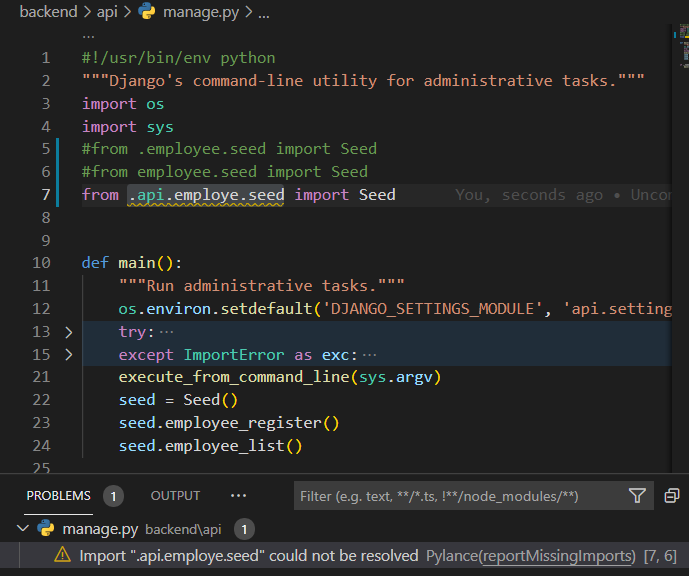
> loyee.see
no that doesn’t work
---
### Author:  [@thelpend](https://forum.djangoproject.com/u/thelpend)
#### Post date: [June 9, 2021, 5:31pm UTC](https://forum.djangoproject.com/t/relative-import-with-no-known-parent-package/8271/7 "2021-06-09T17:31:16Z")
> Are you aware that running that every time your app starts is going to add another copy of that data into the database?
Yes, it’s exactly what i’m trying to do.
> In general, what you’re trying to do here isn’t the appropriate way to do it. You either want to create a fixture file that can be loaded one time using the `manage.py loaddata` , or you might want to create a custom django-admin command
It is just an example; I know that the registration will be repeated every time I start the application.
That is an example with 1 record, but I want to put 100 data, or 1000, or n number of employees.
I am trying to store records in the database without using the shell through the console.
what is the correct way to do it?
What I’m trying to do is create different scripts in different python files to organize the logic that will go into the employee application.
---
### Author:  [@KenWhitesell](https://forum.djangoproject.com/u/KenWhitesell)
#### Post date: [June 9, 2021, 6:21pm UTC](https://forum.djangoproject.com/t/relative-import-with-no-known-parent-package/8271/8 "2021-06-09T18:21:58Z")
> [@thelpend](#):
>
> Yes, it’s exactly what i’m trying to do.
So when you run this for the 10th time, you want 10 copies of that _same_ data in the database? If you’re doing it with 100 users, you want 1000 entries in your database? These entries don’t go away when the app ends.
The way you’re designing this, you’re going to have n \* m rows in the database, where n is the number of users and m is the number of times you’ve started your app.
> [@thelpend](#):
>
> what is the correct way to do it?
If you haven’t yet worked your way through the [Official Django Tutorial](https://docs.djangoproject.com/en/3.2/intro/tutorial01/), that’s the best place to start. If you have completed that, then…
> [@KenWhitesell](#):
>
> You either want to create a fixture file that can be loaded one time using the `manage.py loaddata` , or you might want to create a custom django-admin command.
See [Providing initial data for models | Django documentation | Django](https://docs.djangoproject.com/en/3.2/howto/initial-data/#providing-initial-data-for-models) and [Writing custom django-admin commands | Django documentation | Django](https://docs.djangoproject.com/en/3.2/howto/custom-management-commands/)
What you don’t want to do is have this type of code run automatically with each start.
You also need to be aware that when you’re running Django, your “current directory” is _not_ the directory for each file being run - it’s the directory where you’re running manage.py. Relative imports are relative to _that_ location, not the location of the function currently being executed.