Serving Media - when Debug = False

I’m having trouble displaying images in all of my django projects source
after taking debug out. I’ve taken a considerable amount of effort to store the images correctly and in a predictable manner but I’m getting NO images when I change debug = False!

This is the project here
You can see that when you interact with the media a 404 error occurs. It would not occur if debug = True, this only happens when debug = False.

Managing files | Django documentation | Django is the reference I’ve been using to troubleshoot this problem, and from what I see in the code the logic is all correct. It’s the serving of them after debug is out that I’m unsure of.

The service is running

Media is not displaying:
Media uploads and stores to the correct folders

The directory structure of the server that the django application is running on: the hashes are present to convey the depth of the structure

/srv/www/
code
html
-static
--css
--js
-media
--images
--original_images
logs

project settings

STATICFILES_FINDERS = [
    "django.contrib.staticfiles.finders.FileSystemFinder",
    "django.contrib.staticfiles.finders.AppDirectoriesFinder",
    "django.contrib.staticfiles.finders.AppDirectoriesFinder",
]

STATICFILES_DIRS = [
    os.path.join(PROJECT_DIR, "static"),
]

STATIC_ROOT = os.path.join(os.path.dirname(BASE_DIR), 'html', 'stati
c')
#STATIC_ROOT = os.path.join(BASE_DIR, "static")
STATIC_URL = "/static/"

MEDIA_ROOT = os.path.join(os.path.dirname(BASE_DIR), 'html', 'media'
)

#MEDIA_ROOT = os.path.join(BASE_DIR, "media")
MEDIA_URL = "/media/"

middleware

MIDDLEWARE = [
    "django.contrib.sessions.middleware.SessionMiddleware",
    "django.middleware.common.CommonMiddleware",
    "django.middleware.csrf.CsrfViewMiddleware",
    "django.contrib.auth.middleware.AuthenticationMiddleware",
    "django.contrib.messages.middleware.MessageMiddleware",
    "django.middleware.clickjacking.XFrameOptionsMiddleware",
    "django.middleware.security.SecurityMiddleware",
    "wagtail.contrib.redirects.middleware.RedirectMiddleware",
    "whitenoise.middleware.WhiteNoiseMiddleware",
]

nginx (external to host)

    location /media {
	autoindex on;
        alias html/media/;
    }

Welcome @rye-dotcom !

In a production environment, Django shouldn’t be used at all to retrieve either static or media files.

Your nginx configuration should serve the media directory directly.

Also, both STATIC_ROOT and MEDIA_ROOT should be completely outside your project directory. They should be “nginx-friendly” directories, such as under /var/www/.

Similarly, your code should not be anywhere in that same directory tree. You do not want nginx to have direct access to your code.

There have been numerous topics here about deployment of static and media files - see Django Static Files issue with Nginx as one example. (There are many others you could find.)

Hi Ken, Thank you.

I have considerations about nginx friendly serving and the files are collected to ‘srv/www/html/’

The directories are separated with the www-data group has access to ‘srv/www/html/media’ and not access to the code.

Maybe the misconfiguration is in this detail?

    root /srv/www/html;

    location /media {
	autoindex on;
        alias html/media/;
    }

1 Like

I’d check the nginx error log to see what nginx is trying to do and why it’s failing.

This looks to me like a request for /media/some_file would be looked for in /srv/www/html/html/media/some_file.

1 Like

my staticfiles config for nginx is the following

location /static/ {
        root /home/ubuntu/project_name/frontend/build; #absolute url with pwd
        expires 365d;
        access_log off;
        add_header Cache-control "public, no-transform";
        }

so id think that it would be work as the same with the media folder url. dont forget run nginx -t on save to test your configuration and know i you have any issue

Still in to the same sort of issue

So I’m not 100% sure where I need to resolve it or even how to troubleshoot the issue, I tried deploying the code again on a different host just for isolation and the SAME problem occured.

|

in debug - │2025/07/19 14:05:12 [debug] 78932#78932: *35488 http2 header: “accept-encoding: gzip, deflate, br” │
│2025/07/19 14:05:12 [debug] 78932#78932: *35488 http2 request line: "GET /media/images/IMG_1577.max-165x│
│2025/07/19 14:05:12 [debug] 78932#78932: *35488 generic phase: 0 │
│2025/07/19 14:05:12 [debug] 78932#78932: *35488 rewrite phase: 1 │
│2025/07/19 14:05:12 [debug] 78932#78932: *35488 test location: “/” │
│2025/07/19 14:05:12 [debug] 78932#78932: *35488 test location: “media/” │
│2025/07/19 14:05:12 [debug] 78932#78932: *35488 using configuration “/media/”

Two things -

  1. Please don’t post images of textual information. Not only is difficult to read, but it’s also incomplete, as there is text cut off on the left side of the first section. Copy/paste the relevent portions of the log into your post, marked as preformatted text.

  2. Keep in mind that nginx needs to be able to search through all directories above the directory containing the file itself. It can’t just “jump” into the media directory without being able to locate it within /srv/www/html. (That’s just one of the reasons why I recommend getting the static and media directories completely out of the project’s directory structure.)

1 Like

Hi Ken,
I read a few other documents and still can’t come to a resolution.

What is the method that I should structure the static and media storage. S3 style storage is not appropriate for this project - it has to be on the disk

"""
Django settings for mysite project.

Generated by 'django-admin startproject' using Django 5.2.4.

For more information on this file, see
https://docs.djangoproject.com/en/5.2/topics/settings/

For the full list of settings and their values, see
https://docs.djangoproject.com/en/5.2/ref/settings/
"""

# Build paths inside the project like this: os.path.join(BASE_DIR, ...)
import os

PROJECT_DIR = os.path.dirname(os.path.dirname(os.path.abspath(__file__)))
BASE_DIR = os.path.dirname(PROJECT_DIR)


# Quick-start development settings - unsuitable for production
# See https://docs.djangoproject.com/en/5.2/howto/deployment/checklist/


# Application definition

INSTALLED_APPS = [
    "home",
    "blog",
    "base",
    "search",
    "portfolio",
    "wagtail.contrib.forms",
    "wagtail.contrib.settings",
    "wagtail.contrib.redirects",
    "wagtail.embeds",
    "wagtail.sites",
    "wagtail.users",
    "wagtail.snippets",
    "wagtail.documents",
    "wagtail.images",
    "wagtail.search",
    "wagtail.admin",
    "wagtail",
    "modelcluster",
    "taggit",
    "django_filters",
    "django.contrib.admin",
    "django.contrib.auth",
    "django.contrib.contenttypes",
    "django.contrib.sessions",
    "django.contrib.messages",
    "django.contrib.staticfiles",
]

MIDDLEWARE = [
    "django.contrib.sessions.middleware.SessionMiddleware",
    "django.middleware.common.CommonMiddleware",
    "django.middleware.csrf.CsrfViewMiddleware",
    "django.contrib.auth.middleware.AuthenticationMiddleware",
    "django.contrib.messages.middleware.MessageMiddleware",
    "django.middleware.clickjacking.XFrameOptionsMiddleware",
    "django.middleware.security.SecurityMiddleware",
    "wagtail.contrib.redirects.middleware.RedirectMiddleware",
]

ROOT_URLCONF = "mysite.urls"

TEMPLATES = [
    {
        "BACKEND": "django.template.backends.django.DjangoTemplates",
        "DIRS": [
            os.path.join(PROJECT_DIR, "templates"),
        ],
        "APP_DIRS": True,
        "OPTIONS": {
            "context_processors": [
                "django.template.context_processors.debug",
                "django.template.context_processors.request",
                "django.contrib.auth.context_processors.auth",
                "django.contrib.messages.context_processors.messages",
                "wagtail.contrib.settings.context_processors.settings",
            ],
        },
    },
]

WSGI_APPLICATION = "mysite.wsgi.application"


# Database
# https://docs.djangoproject.com/en/5.2/ref/settings/#databases

DATABASES = {
    "default": {
        "ENGINE": "django.db.backends.sqlite3",
        "NAME": os.path.join(BASE_DIR, "db.sqlite3"),
    }
}


# Password validation
# https://docs.djangoproject.com/en/5.2/ref/settings/#auth-password-validators

AUTH_PASSWORD_VALIDATORS = [
    {
        "NAME": "django.contrib.auth.password_validation.UserAttributeSimilarityValidator",
    },
    {
        "NAME": "django.contrib.auth.password_validation.MinimumLengthValidator",
    },
    {
        "NAME": "django.contrib.auth.password_validation.CommonPasswordValidator",
    },
    {
        "NAME": "django.contrib.auth.password_validation.NumericPasswordValidator",
    },
]


# Internationalization
# https://docs.djangoproject.com/en/5.2/topics/i18n/

LANGUAGE_CODE = "en-us"

TIME_ZONE = "UTC"

USE_I18N = True

USE_TZ = True


# Static files (CSS, JavaScript, Images)
# https://docs.djangoproject.com/en/5.2/howto/static-files/

STATICFILES_FINDERS = [
    "django.contrib.staticfiles.finders.FileSystemFinder",
    "django.contrib.staticfiles.finders.AppDirectoriesFinder",
]

STATICFILES_DIRS = [
    os.path.join(PROJECT_DIR, "static"),
]

STATIC_ROOT = os.path.join(BASE_DIR, "static")
STATIC_URL = "/static/"

MEDIA_ROOT = os.path.join(BASE_DIR, "media")
MEDIA_URL = "/media/"

# Default storage settings, with the staticfiles storage updated.
# See https://docs.djangoproject.com/en/5.2/ref/settings/#std-setting-STORAGES
STORAGES = {
    "default": {
        "BACKEND": "django.core.files.storage.FileSystemStorage",
    },
    # ManifestStaticFilesStorage is recommended in production, to prevent
    # outdated JavaScript / CSS assets being served from cache
    # (e.g. after a Wagtail upgrade).
    # See https://docs.djangoproject.com/en/5.2/ref/contrib/staticfiles/#manifeststaticfilesstorage
    "staticfiles": {
        "BACKEND": "django.contrib.staticfiles.storage.ManifestStaticFilesStorage",
    },
}

# Django sets a maximum of 1000 fields per form by default, but particularly complex page models
# can exceed this limit within Wagtail's page editor.
DATA_UPLOAD_MAX_NUMBER_FIELDS = 10_000


# Wagtail settings

WAGTAIL_SITE_NAME = "mysite"

# Search
# https://docs.wagtail.org/en/stable/topics/search/backends.html
WAGTAILSEARCH_BACKENDS = {
    "default": {
        "BACKEND": "wagtail.search.backends.database",
    }
}

# Base URL to use when referring to full URLs within the Wagtail admin backend -
# e.g. in notification emails. Don't include '/admin' or a trailing slash
WAGTAILADMIN_BASE_URL = "http://example.com"

# Allowed file extensions for documents in the document library.
# This can be omitted to allow all files, but note that this may present a security risk
# if untrusted users are allowed to upload files -
# see https://docs.wagtail.org/en/stable/advanced_topics/deploying.html#user-uploaded-files
WAGTAILDOCS_EXTENSIONS = [
    "csv",
    "docx",
    "key",
    "odt",
    "pdf",
    "pptx",
    "rtf",
    "txt",
    "xlsx",
    "zip",
]

There is a load balancer NGINX which handles connection to the ‘outside’ and an application ‘nginx’ that handles serving the media.

Do I need new directories on the application host?

the directory structure is

> lr /srv/www/
.venv/       code/        html/        logs/        server.sock

So as far as I can tell I have had code in a separate directory.

> ls /srv/www/code/
 Dockerfile   manage.py          yq
 base         mysite            'ystemctl enable gunicornaqqq'
 blog         portfolio         'ystemctl start gunicorn.socket'
 db.sqlite3   requirements.txt
 home         search

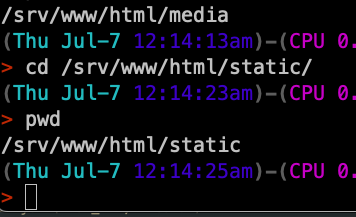
Dir path for html

> ls /srv/www/html/
media  static

Thanks for your help.
You haven’t really provided a lot of specifics regarding your deployment environment, such as the UIDs involved (what’s running these processes? what’s doing the deployment and collectstatic?), or the specific nginx configuration elements for your static and media files, so the best I can do at the moment is outline the general recommendations.

  1. Set STATIC_ROOT=/var/www/html/project_name/static
  2. Set MEDIA_ROOT=/var/www/html/project_name/media
  3. Ensure that this complete directory structure can be read by group www-data.
  4. Set the group sticky bit on the static and media directories.
  5. Define your nginx paragraphs to use those directories as the aliases for your STATIC_URL and MEDIA_URL settings.
  6. Run collectstatic to copy the static files into /var/www/html/project_name/static. Verify that all files & directories are group www-data

Should there be any problems with accessing static files after this, check your nginx logs to get the specific errors being logged for those requests.

Use Django White Noise. I hope this helps.

pip install whitenoise

In development

INSTALLED_APPS = [
    # ...
    "whitenoise.runserver_nostatic",
    "django.contrib.staticfiles",
    # ...
]

in production


MIDDLEWARE = [
    # ...
    "django.middleware.security.SecurityMiddleware",
    "whitenoise.middleware.WhiteNoiseMiddleware",
    # ...
]
STORAGES = {
    # ...
    "staticfiles": {
        "BACKEND": "whitenoise.storage.CompressedManifestStaticFilesStorage",
    },
}

Here Is the documentation, Do let us know if it worked.

This is not the problem. Whitenoise is a consideration.

Root Cause:

  • Gunicorn socket (gunicorn.sock) was already in use while gunicorn.socket was also being enabled, leading to conflicts.

  • Nginx on the border gateway was not properly configured to forward requests to the internal application server via TCP.

  • Static and media files were not being correctly proxied, leading to missing images despite CSS loading.

Resolution Steps:

  1. Disabled Conflicting Socket:

    • Disabled and stopped gunicorn.socket to prevent conflict with the active gunicorn.service that was managing the socket.

      systemctl disable --now gunicorn.socket

  2. Verified Gunicorn Service:

    • Ensured that gunicorn.service was actively binding to /run/gunicorn.sock and running under the correct working directory and user context.
  3. Border Gateway Nginx Configuration:

    • Updated Nginx configuration to:

      • Use HTTPS with a valid certificate.

      • Forward traffic to the internal IP (IPV4:8000) where Nginx was running on the internal server and proxying requests to Gunicorn’s Unix socket.

      • Set appropriate headers to handle host and client IP forwarding.

  4. Internal Host Configuration:

    • Ensured that internal Nginx served static and media files separately with correct alias paths.

    • Verified permissions and existence of static files in expected directories.

  5. Verified Fix:

    • Confirmed that HTTPS requests from the public domain successfully reached the Gunicorn-backed Django application.

    • Images and static assets load properly.

    • Error logs were clean of socket conflicts and 502/504 errors.

Outcome:

  • Django application is now accessible via the border gateway using HTTPS.

  • All static files, including images and stylesheets, are served correctly.

  • Systemd services are stable and conflict-free.