deployed django app can't fetch data from the server

I was working on an e-ecommerce app using Django and I deployed it to railway.App

after pushing few commits to the git repo, the app stopped displaying photos, though the photos are persistent in the data base .

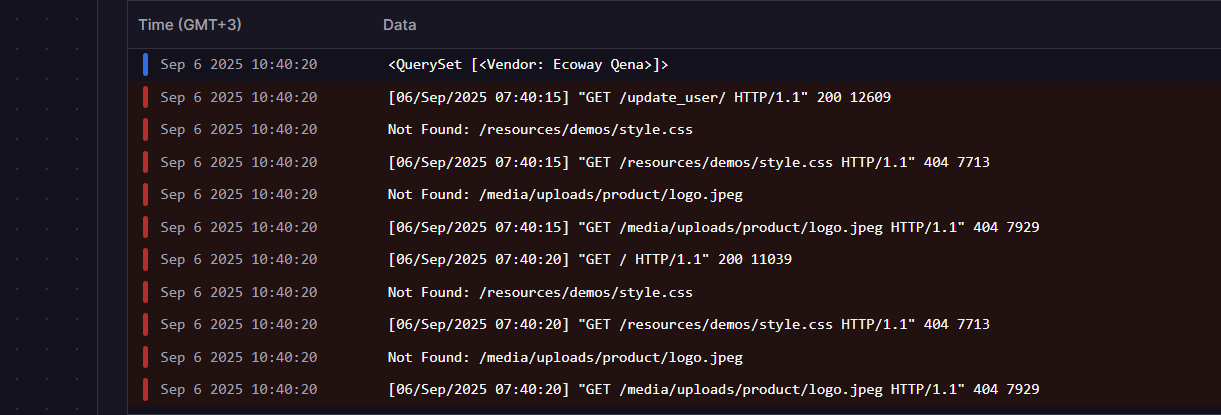
upon inspecting the developers in my browser, I found the following error messages.

I’m not really sure what makes it fail to get the photo from the server, as it was working correctly.

No one can provide specific help without seeing any code.

Things I would be thinking about if it was my site:

  1. Are these photos “static” or “media” files?
  2. Are other photos displaying or is it only specific ones?
  3. If it’s a “static” file have I run manage.py collectstatic since I last deployed code?
  4. Does the file exist on the server’s file system in the location I would expect?
  5. When I view the source HTML in the browser, is the path to the image file what I would expect?
  6. Does the image load if I use that path directly in the browser?
  7. If it’s a “media” file does the object with an ImageField describing it contain the data I would expect?

I really appreciate your answer,

after quite tinkering with my app, what I found that I deployed my app with debug = True which is not recommended, so I turned debug = false, and run manage.py collectstatic again, now all the images are not appearing at all on my webapp

here is my settings.py

"""
Django settings for shubeik project.

Generated by 'django-admin startproject' using Django 5.1.4.

For more information on this file, see
https://docs.djangoproject.com/en/5.1/topics/settings/

For the full list of settings and their values, see
https://docs.djangoproject.com/en/5.1/ref/settings/
"""

from pathlib import Path
import os
from dotenv import load_dotenv


# Build paths inside the project like this: BASE_DIR / 'subdir'.
BASE_DIR = Path(__file__).resolve().parent.parent


#load environmental variables
load_dotenv()

# Quick-start development settings - unsuitable for production
# See https://docs.djangoproject.com/en/5.1/howto/deployment/checklist/

# SECURITY WARNING: don't run with debug turned on in production!
DEBUG = False


# Application definition

INSTALLED_APPS = [
    'django.contrib.admin',
    'django.contrib.auth',
    'django.contrib.contenttypes',
    'django.contrib.sessions',
    'django.contrib.messages',
    'django.contrib.staticfiles',
    'store',
    'cart',
    'payment',
    'messenger',
    'whitenoise.runserver_nostatic',
]

MIDDLEWARE = [
    'django.middleware.security.SecurityMiddleware',
    'django.contrib.sessions.middleware.SessionMiddleware',
    'django.middleware.common.CommonMiddleware',
    'django.middleware.csrf.CsrfViewMiddleware',
    'django.contrib.auth.middleware.AuthenticationMiddleware',
    'django.contrib.messages.middleware.MessageMiddleware',
    'django.middleware.clickjacking.XFrameOptionsMiddleware',
    'whitenoise.middleware.WhiteNoiseMiddleware',
]

ROOT_URLCONF = 'shubeik.urls'

TEMPLATES = [
    {
        'BACKEND': 'django.template.backends.django.DjangoTemplates',
        'DIRS': [],
        'APP_DIRS': True,
        'OPTIONS': {
            'context_processors': [
                'django.template.context_processors.debug',
                'django.template.context_processors.request',
                'django.contrib.auth.context_processors.auth',
                'django.contrib.messages.context_processors.messages',
                'cart.context_processors.cart',
            ],
        },
    },
]

WSGI_APPLICATION = 'shubeik.wsgi.application'


# Database
# https://docs.djangoproject.com/en/5.1/ref/settings/#databases

DATABASES = {
    'default': {
        # 'ENGINE': 'django.db.backends.sqlite3',
        # 'NAME': BASE_DIR / 'db.sqlite3',
        'ENGINE': 'django.db.backends.postgresql_psycopg2',
        'NAME': 'railway',
        'USER': 'postgres',
        'PASSWORD': os.environ['DB_PASSWORD'],
        'HOST': 'metro.proxy.rlwy.net',
        'PORT': '31497',
    }
}


# Password validation
# https://docs.djangoproject.com/en/5.1/ref/settings/#auth-password-validators

AUTH_PASSWORD_VALIDATORS = [
    {
        'NAME': 'django.contrib.auth.password_validation.UserAttributeSimilarityValidator',
    },
    {
        'NAME': 'django.contrib.auth.password_validation.MinimumLengthValidator',
    },
    {
        'NAME': 'django.contrib.auth.password_validation.CommonPasswordValidator',
    },
    {
        'NAME': 'django.contrib.auth.password_validation.NumericPasswordValidator',
    },
]


# Internationalization
# https://docs.djangoproject.com/en/5.1/topics/i18n/

LANGUAGE_CODE = 'en-us'

TIME_ZONE = 'UTC'

USE_I18N = True

USE_TZ = True


# Static files (CSS, JavaScript, Images)
# https://docs.djangoproject.com/en/5.1/howto/static-files/

STATIC_URL = 'static/'
STATICFILES_DIRS =  (os.path.join(BASE_DIR, 'static'),)  #['static/']

# White noise static stuff
STATICFILES_STORAGE = 'whitenoise.storage.CompressedManifestStaticFilesStorage'
STATIC_ROOT = BASE_DIR / 'staticfiles'


MEDIA_URL = '/media/'
MEDIA_ROOT = os.path.join(BASE_DIR, 'media')

# Default primary key field type
# https://docs.djangoproject.com/en/5.1/ref/settings/#default-auto-field

DEFAULT_AUTO_FIELD = 'django.db.models.BigAutoField'


# ### Backend session storage
# SESSION_ENGINE = 'django.contrib.sessions.backends.db'


and here is urls.py

from django.contrib import admin
from django.urls import path, include
from . import settings
from django.conf.urls.static import static 
# from django.conf import settings

urlpatterns = [
    path('admin/', admin.site.urls),
    path('', include('store.urls')),
    path('cart/', include('cart.urls')),
    path('payment/', include('payment.urls')),
    path('messenger/', include('messenger.urls')), 
] + static(settings.MEDIA_URL, document_root=settings.MEDIA_ROOT)

What is the output from manage.py collectstatic?

If you view source of a page in your browser what do the <img …> tags look like?

here is the output of collect static

Type 'yes' to continue, or 'no' to cancel: yes

0 static files copied to 'C:\Users\DRMINA2019\OneDrive\professional_projects\shubeik - Multi - Vendors - CheckOut - Ngrok - production-1\shubeik\staticfiles', 130 unmodified.

and when inspecting img tag in the template

<img class="card-img-top" src="/media/uploads/product/logo.jpeg" alt="...">

notice that now I turned debug = True

Leave it as debug = False - static files are treated differently in each case, so it’s impossible to debug the problem if you change it to True.

The <img> tag you show is for a Media file, not a Static file. Is it Media files or Static files that aren’t displaying, or both?

I’m really not sure, but I think only media files are missing because the webapp is not displaying any images at all, thought the photos still exist when inspecting the admin account

We need to know whether it’s Media (images uploaded and attached to models) or Static files (CSS files, JS files, images that are stored as files with your code) or both that aren’t displaying.

only the Media files that are not displaying, the other types are working properly

OK. Have you done anything about hosting Media files? They won’t be served with the rest of the site (Django-generated pages, static assets) but have to be served separately.

I’m not familiar with Railway but perhaps something like this Deploy Django with Volume Support | Railway ?

for my project I just followed the tutorial of johnny elder in which he did not mention anything special about the media files.

Django Wednesdays Ecommerce - YouTube

and regarding volume support, it is not clear for me how to use it, don’t you have other suggestions?

Yes, I scanned through the transcript of Push Our App To Web Hosting - Django Wednesdays ECommerce 44 and he doesn’t seem to mention media files at all, which is a shame. None of the later videos look like they’d cover that.

As I say, I’ve never used Railway so I can’t help specifically. Wherever you host Django you’ll need to serve media files somehow. If you don’t want to work out how to use a Volume with Railway (whatever that is) then you could look into how to host media files somewhere like Amazon S3 using django-storages. e.g. Storing Django Static and Media Files on Amazon S3 | TestDriven.io

yes, that is exactly the case, I have checked the later videos, and I noticed he was always working with debug= true maybe he was planning to add more features,

by the way the app works fine as long as debug= true and there are no new updates and commits to the GitHub repo, and the problem starts after a new commit is pushed to the GitHub repo.

so now I made a new commit, and checked the URL for the missing image, what I found is that gives the following error

Page not found (404)
“/app/media/uploads/product/logo.jpeg” does not exist
Request Method:	GET
Request URL:	http://shubeiklubeik-production.up.railway.app/media/uploads/product/logo.jpeg
Raised by:	django.views.static.serve
Using the URLconf defined in shubeik.urls, Django tried these URL patterns, in this order:

admin/
[name='home']
about/ [name='about']
login/ [name='login']
logout/ [name='logout']
register/ [name='register']
update_password/ [name='update_password']
update_user/ [name='update_user']
update_info/ [name='update_info']
product/<int:pk> [name='product']
category/<str:foo> [name='category']
category_summary/ [name='category_summary']
add_new_product/<int:id> [name='add_new_product']
edit_product/<int:id> [name='edit_product']
add_new_shop/ [name='add_new_shop']
my_shop/<int:id> [name='my_shop']
view_shop/<int:id> [name='view_shop']
view_shop_generic/<int:id> [name='view_shop_generic']
search/ [name='search']
cart/
payment/
messenger/
^media/(?P<path>.*)$
The current path, media/uploads/product

after I reupload the image again the same URL address works fine, and it does retrieve the image

here are the error messages from the railway.app deploy log

Which image? Which URL? Is this with debug=True or not? When you say “reupload” what exactly do you mean?

I don’t understand why it’s trying to find static assets in a resources directory when your settings and urls.py don’t mention that. Show your template code where you refer to style.css.

We would expect the errors for files in media because you haven’t set up a way to serve media files (assuming debug=False).

Hi @philgyford

I still use debug=true, what I mean is that after making a new commit, all photos are lost, so I just navigate to my app URL like any normal user and upload the lost images again to the website,

but this is not a solution.

it turns out that such behavior of losing the media file upon updating the app and redeploying it, is not a bug at all it’s the normal behavior by railway.com servers as cited here in the railway docs

Railway | FlowiseAI

The default filesystem for services running on Railway is ephemeral. Flowise data does not persist across deploys and restarts. To solve this issue, we can use Railway Volume.


and the only possible solution is to use a volume mount as described here

Using Volumes | Railway Docs

and after following the steps, the problem disappeared with all images are now persistent through every cycle of updating the app while keeping debug= true.

I am answering that here as a reference for all other users who followed the project in the ecommerce playlist by johnny elder

here Django Wednesdays Ecommerce - YouTube

and for sure they will suffer a lot by such problem as most of the channel followers have no expertise in DEVOPS as they are just wanting to learn Django.

Well done.

Be sure to set DEBUG = False because your site isn’t secure or efficient with it set to True. This will change how static files are served.

@philgyford

sure, but in case of setting debug = False, all the media files disappear again due to the different way Django handles media files in production mode than in development mode.

to solve this issue, I had to find a host for the media files only, and after a bit of search I decided to use Cloudinary as the CDN due to its setup simplicity.

I followed the Cloudinary docs Manage Images in a Django App Video Tutorial | Documentation,

and with the lord help it worked fine as expected.

I’m writing this as a follow up post to my previous comment, so anybody who follows johnny elder Ecommerce Django tutorial can finalize the project by following my steps to pushing the project for production .